Reviews
Gusto Review 2026: What We Actually Pay (Real Account Walkthrough)
Updated · clark056
Affiliate disclosure: Payroll Research may earn a commission if you sign up through links on this page. It never changes our price math or rankings.
Quick take: Gusto isn’t the cheapest payroll software, but it’s one of the easiest to live with. On the Simple plan we pay $49 a month plus $6 per person, and Gusto files our federal and state payroll taxes automatically. With two people on payroll that’s $61 a month, which puts Gusto in the middle of the pack among the 11 providers we track. If you’re a solo owner thinking about an S corp, Gusto Solo is the most interesting part of the lineup.
Try Gusto with our referral link: Gusto’s current referral offer is $100 after you run your first payroll (terms apply). More on how that works below.
What this review covers
- Gusto Solo: payroll for solopreneurs, with S-corp setup included
- Gusto’s S-corp tax savings calculator
- Bill pay, invoicing, contractor payments and business insurance
- Our real Gusto bill, and what payroll costs at different team sizes
- The Taxes & Compliance dashboard
- Where Gusto ranks on price among the 11 providers we compare
Gusto Solo: payroll for solopreneurs, S-corp setup included
Gusto Solo is aimed at one-person businesses that want to pay themselves properly, usually after electing S-corporation tax status. Gusto’s page describes it simply as “Payroll for solopreneurs. S-corp setup included,” and says it has more than 30,000 Solo customers across all 50 states.
Gusto’s pricing page lists Solo at $49 a month plus $6 per person, the same rates as its Simple plan. For a one-person S corp, that works out to about $55 a month.
What Solo adds for S-corp owners, according to Gusto:
- Guided S-corp election (IRS Form 2553) with a progress tracker
- Automated payroll with the correct FICA withholding for your owner salary
- Quarterly Form 941 filing and year-end W-2 and 1099 generation
- A reasonable-salary calculator and audit-ready salary records
- An AI S-corp advisor and a compliance hub dashboard
If you’re weighing an S corp, read our guide to S-corp payroll rules for a single-member owner first. It covers reasonable salary, health insurance on the W-2, and the filing deadlines that come with running payroll for yourself.
Gusto’s S-corp tax savings calculator
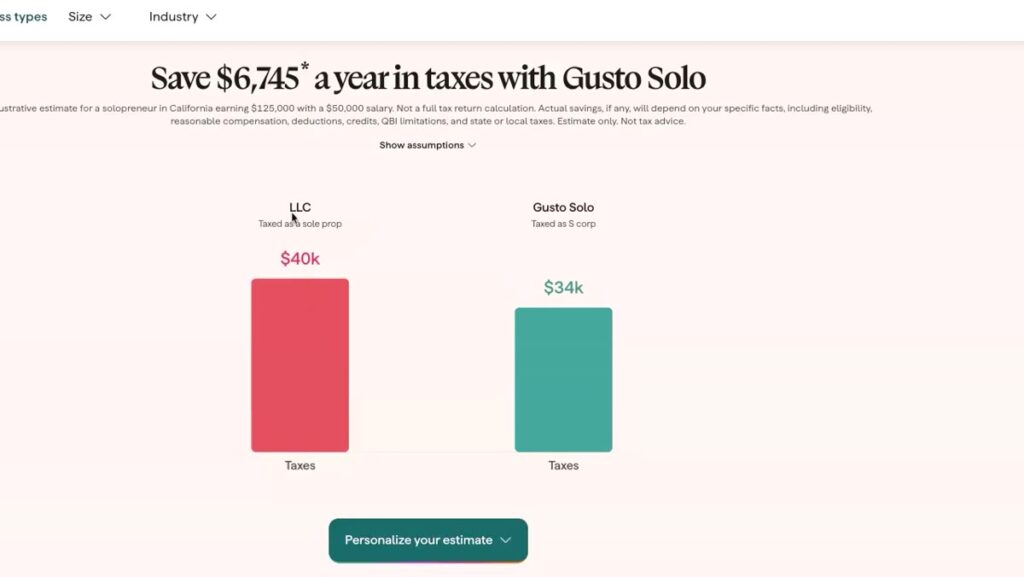
Gusto’s calculator compares an LLC taxed as a sole proprietor with the same business taxed as an S corp. Its default example is a solopreneur in California earning $125,000 in net profit and paying themselves a $50,000 salary:
| LLC (sole prop) | S corp with Gusto Solo | |
|---|---|---|
| Estimated taxes | About $40,000 | About $34,000 |
| You keep | About $85,000 | About $91,000 |
| Estimated savings | — | $6,745 a year |
You can change the profit, salary and ZIP code to personalize the estimate, and there’s an option to model extra savings from a Solo 401(k). Gusto labels these figures as an illustrative estimate, not tax advice. Your real savings depend on your salary, deductions, state and local taxes, and whether an S corp makes sense for you at all. Check with a CPA before electing S-corp status.
Bill pay, contractor payments and insurance
Gusto positions Solo and its small-business plans as a platform to “pay yourself, get paid, pay others, and stay protected.” Beyond payroll, the tools shown in the video include:
- Bill pay and invoicing: send invoices, track payments and pay bills from your Gusto account.
- Contractor payments: pay 1099 contractors, with 1099 filing handled for you.
- Business insurance: offered through Gusto’s partner NEXT Insurance, plus pay-as-you-go workers’ comp that’s integrated with payroll.
What Gusto costs at different team sizes
Every Gusto plan charges a monthly base fee plus a fee for each person you pay, so the per-person fee matters more as you grow. Here’s what the two most common plans cost at list price (October 2026):
| People on payroll | Simple ($49 + $6/person) | Plus ($80 + $12/person) |
|---|---|---|
| 1 | $55 | $92 |
| 2 | $61 | $104 |
| 5 | $79 | $140 |
| 10 | $109 | $200 |
| 25 | $199 | $380 |
| 50 | $349 | $680 |
Watch the state line: Simple covers payroll in one state. If you hire someone who lives in another state, Gusto moves you to Plus, which doubles the per-person fee. Our Gusto vs QuickBooks Payroll cost comparison shows how much that changes the math.
Inside our Gusto account: what we actually pay
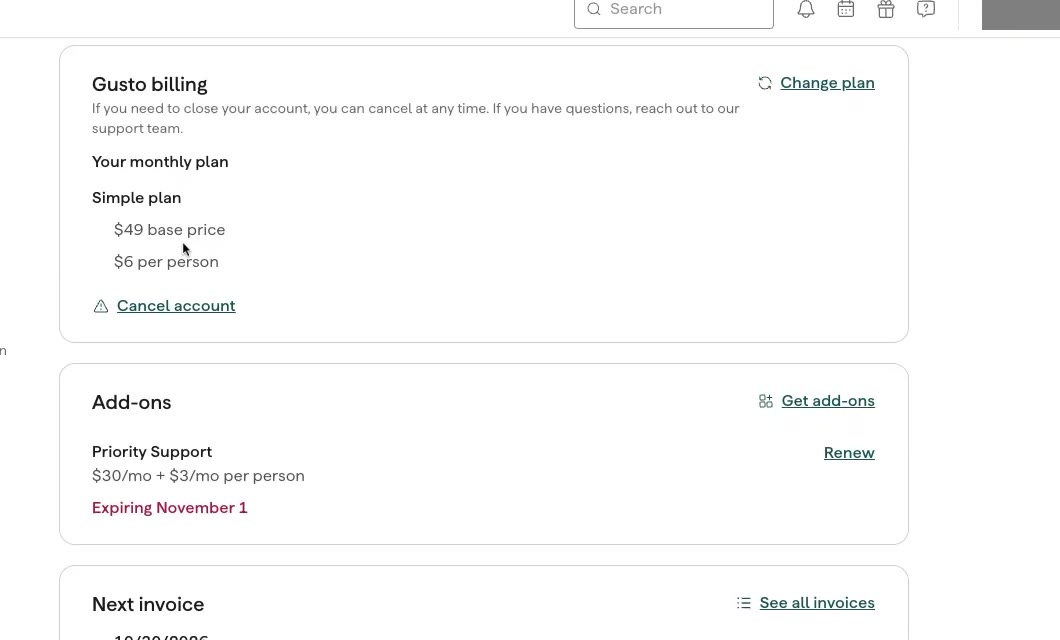
Here’s the billing page from our own account. We’re on the Simple plan at $49 base + $6 per person, with two active employees, so our payroll subscription is $61 a month.
Two things worth knowing from the billing page:
- Add-ons cost extra. Our account had Gusto’s Priority Support add-on, which costs $30 a month plus $3 per person. It’s optional, and ours was set to expire November 1.
- No long-term contract. Gusto’s billing page says you can cancel at any time, and you’re billed monthly.
The Taxes & Compliance dashboard
This is where Gusto earns its fee. The Taxes & Compliance overview in our account shows:
- Tax account setup: marked complete for our state.
- Tax filings: “Tax filing successful” for one federal and one state filing, filed by Gusto automatically.
- Upcoming dates and filings: the next deadlines Gusto will handle.
- Tasks: anything you still need to do yourself. Ours flagged one overdue item: displaying or distributing the required federal and state labor law posters.
That last point is a useful reality check. Gusto automates payroll tax filings, but some compliance jobs, like posting labor law notices, still land on you. The dashboard keeps them visible so they don’t slip.
Gusto vs. 10 other payroll providers on price
We ran our own setup, two people on payroll in one state, through the Payroll Research cost calculator. Each provider is priced on its cheapest plan that files payroll taxes for you:
| Rank | Provider | Monthly cost (2 people) |
|---|---|---|
| 1 | Patriot Software | $47 |
| 2 | Square Payroll | $47 |
| 3 | Paychex Flex | $49 (estimate) |
| 4 | Wave Payroll | $52 |
| 5 | Rippling | $56 (starting price) |
| 6 | Deel | $58 |
| 7 | Gusto | $61 |
| 8 | OnPay | $61 |
| 9 | Homebase | $61 |
| 10 | QuickBooks Payroll | $64 |
So on price alone, Gusto is mid-pack: about $14 a month more than the cheapest full-service options for a two-person team, and a few dollars less than QuickBooks. What you’re paying for is the experience: a clean interface, built-in onboarding and HR tools, and automatic federal, state and local tax filing on every plan. At 10 employees, Gusto Simple is $109 a month, tied with OnPay and Homebase and still below QuickBooks’ entry plan ($120).
Prices change, and your headcount and states change the answer. Run your own numbers in the calculator.
Who Gusto is best for
Gusto is a strong fit if you:
- Run a small team in one state and want payroll that mostly runs itself
- Are a solo owner considering an S corp (Gusto Solo handles the setup and the owner payroll)
- Want onboarding, offer letters and employee self-service included
- Use QuickBooks Online, Xero, or a POS like Square, Toast, Clover or Shopify POS
Look elsewhere if you:
- Want the lowest possible price (Patriot Software and Square Payroll are about $14 a month cheaper at two people)
- Pay people in several states and want to stay on an entry plan (OnPay and Square include multi-state payroll)
- Need employees outside the US (Deel or Rippling are built for that)
See Gusto’s plans and get $100 after your first payroll →
How to get the $100 referral bonus
Gusto runs a referral program for new customers. When you sign up through our link, Gusto’s sign-up page currently shows the offer as “Earn $100 after running your first payroll.” Here’s how it works:
- Sign up through our Gusto referral link. Creating your account is free, and you don’t pay until you run payroll.
- Set up your company, employees and tax accounts.
- Run your first paid payroll.
- Gusto sends the reward after your first paid invoice, provided your account is still active.
Referral rewards, amounts and eligibility are set by Gusto and change from time to time, so check the terms on the sign-up page before you rely on the bonus.
Running payroll in Gusto
Once you’re set up, running payroll is the easy part. Gusto says you can run payroll “in minutes, from anywhere”: you review hours and pay, submit, and Gusto calculates the taxes and files them with federal and state agencies. Gusto also says customers save an average of four hours a month on payroll after switching (Gusto, September 2024).
Find your best fit
Gusto won’t be the best choice for every business. Take the three-question Payroll Match Quiz (team size, POS or accounting software, and where your people work) to see which of the 11 providers fits you best.
Gusto FAQs
How much does Gusto cost?
Gusto’s Simple plan is $49 a month plus $6 per person, Plus is $80 + $12 per person, and Premium is $180 + $22 per person (October 2026 list prices). Gusto Solo is listed at $49 + $6 per person.
How much is Gusto for one employee?
About $55 a month on the Simple plan or Gusto Solo ($49 base + $6 for one person), before any add-ons.
Does Gusto require a long-term contract?
No. Gusto bills monthly, and its billing page says you can cancel at any time.
Which taxes does Gusto handle?
Gusto calculates payroll taxes and automatically files federal and state payroll taxes, including quarterly Form 941 and year-end W-2s and 1099s, and it files local taxes on its standard plans. In our account, the Taxes & Compliance dashboard shows each filing as it’s completed.
Is the Gusto S-corp savings estimate accurate?
It’s an illustrative estimate. Gusto’s example ($6,745 a year for a California solopreneur earning $125,000 with a $50,000 salary) is not a tax calculation for your business. Talk to a tax professional before electing S-corp status.
Disclosure: this post contains our Gusto referral link. If you sign up through it, we may receive a reward at no extra cost to you. Tax savings figures are Gusto’s illustrative estimates, not tax advice. Pricing was checked in October 2026; confirm current prices on Gusto’s site.
Keep reading
Industry guides
Best Payroll Software for Food Trucks and Mobile Concessions (2026)
The best payroll for food trucks, concession trailers and caterers: tip handling, seasonal staff, events in other states, and the new 2026 W-2 tip reporting rules.
October 22, 2026
Head-to-head
Gusto vs QuickBooks Payroll: Real Cost Comparison for 1–50 Employees (2026)
Gusto vs QuickBooks Payroll pricing side by side at 1, 5, 10, 25 and 50 employees — including the multi-state surcharge that flips which one is cheaper.
October 22, 2026
Tax rules
S-Corp Payroll Rules for a Single-Member Owner (2026 Guide)
How to pay yourself as the only owner-employee of an S corporation: reasonable salary, health insurance on the W-2, filing deadlines, and the cheapest payroll software for one person.
October 22, 2026